
In short
- According to Argentina’s official table (ENRE), a desktop computer tower uses about 200 W, a 19" LED monitor about 22 W and a laptop also about 22 W.
- At 8 hours a day, the desktop with monitor comes to about 53 kWh a month; the laptop, about 5.3: ten times less.
- In sleep mode, the tower drops to 30 W or less, according to the U.S. Department of Energy table. A screen saver, on the other hand, saves nothing.
- Figures vary a lot between machines, especially gaming PCs: to know what yours uses, measure it.
Words you’ll see
- Tower (CPU): the desktop computer’s case, without the screen.
- Monitor: the screen, counted separately.
- Sleep mode: the computer goes almost off and wakes up in seconds where you left it.
- Watt and kWh: power at any moment and energy over time. More in watts, kWh, volts and amps.
How many watts does a computer use?
| Device | ENRE (Argentina) | U.S. Dept. of Energy |
|---|---|---|
| Desktop tower | 200 W | 120 W awake; 30 W or less asleep |
| Monitor | 22 W (19" LED) | 150 W awake; 30 W or less asleep |
| Laptop | 22 W | 50 W |
The Department of Energy figures come from its table reproduced by Virginia Tech, and its 150 W monitor is an older CRT (tube) type. The EWEB utility guide gives higher figures (60 W for a laptop and 800 W for a computer with monitor) because it’s meant for choosing a generator with headroom.
How much does it use per month?
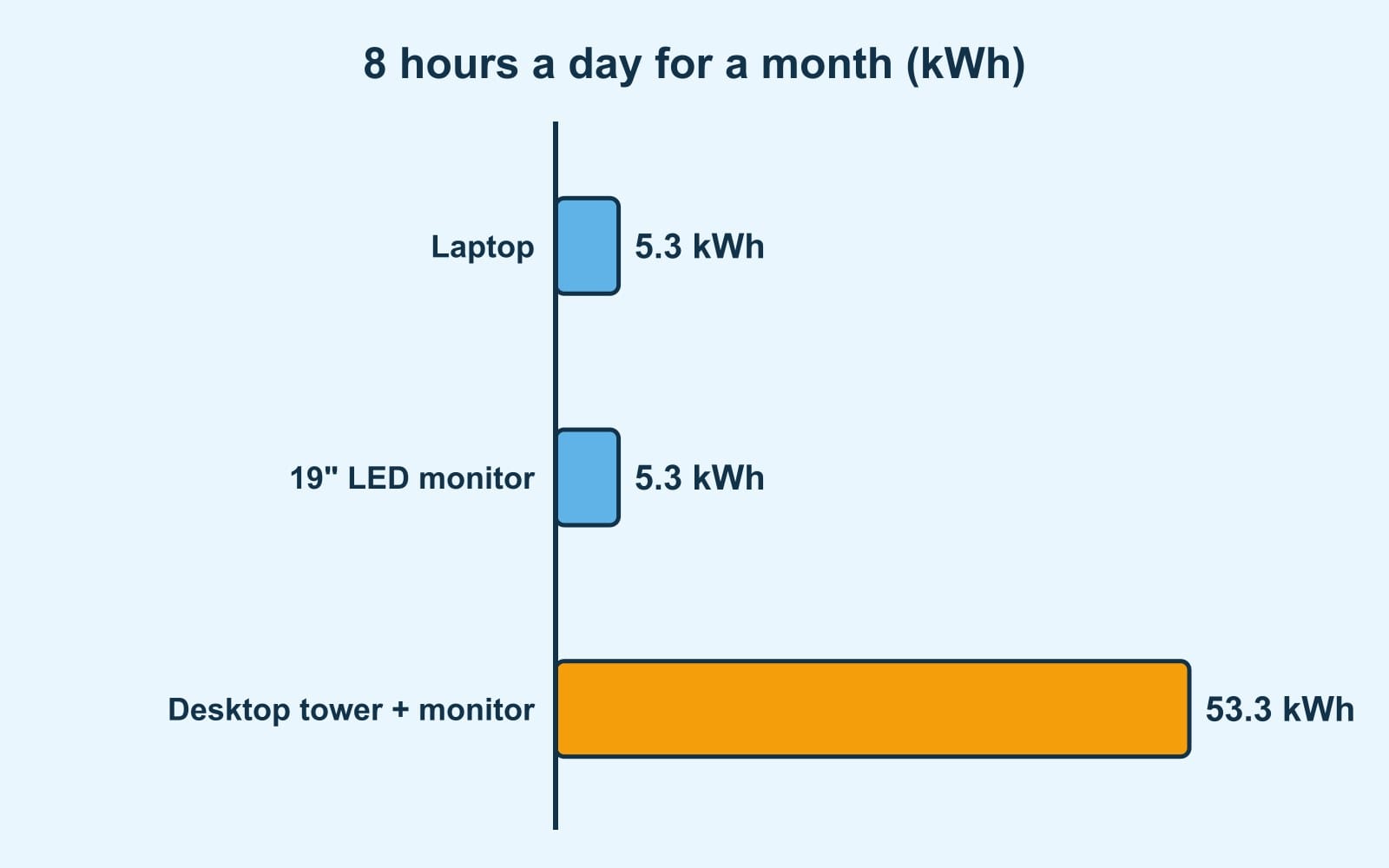
Watts × hours a day × days, using the ENRE figures at 8 hours a day for 30 days:
- Tower + monitor: (200 + 22) × 8 × 30 = 53.3 kWh.
- Monitor alone: 22 × 8 × 30 = 5.3 kWh.
- Laptop: 22 × 8 × 30 = 5.3 kWh.
Worked example: working from home on a desktop or a laptop
Someone works from home 8 hours a day, 22 days a month:
- With the tower and monitor: 222 W × 8 × 22 = 39,072 Wh, about 39.1 kWh a month.
- With the laptop: 22 W × 8 × 22 = 3,872 Wh, about 3.9 kWh.
- Difference: about 35.2 kWh a month. At an example price of $0.15 per kWh (use the one on your bill), about $5.28 a month.
Enter your hours and days in the electricity usage calculator, which includes the tower, the monitor and the laptop.
Sleep mode saves; a screen saver doesn’t
- According to the Department of Energy table, in sleep the tower drops from 120 W to 30 W or less, and so does the monitor.
- ENERGY STAR (the U.S. government’s efficiency program) estimates that enabling power management on a certified desktop saves a home or home office about $15 a year.
- And it warns: a screen saver does not save energy. It keeps the monitor on and sometimes stops the tower from going to sleep.
What about a gaming PC?
The official tables don’t list gaming computers, and what they use changes enormously with the graphics card and what you’re doing: typing isn’t gaming. To find out, use a plug-in energy meter while gaming and while doing other things. We explain how in how to calculate an appliance’s electricity use.
ENERGY STAR certified computers of any kind use 30–40% less energy than standard ones, thanks to more efficient components and better power management when idle.
Common mistakes
- Using a screen saver instead of sleep. It saves nothing (ENERGY STAR).
- Counting only the tower. The monitor adds on top; an old CRT can use more than the tower.
- Switching it off but leaving everything plugged in. Many devices keep drawing power when off; see standby power.
In a power outage
A laptop uses so little that a battery or portable power station can keep it running for many hours: work out how many with the power outage battery calculator. To protect it from surges when the power comes back, read how to protect your appliances. If an outlet or power strip gets hot, have an electrician check it.
Sources and references
- Ente Nacional Regulador del Gas y la Electricidad (Argentina). Consumo básico de electrodomésticos (computer, CPU only, 200 W; 19" LED monitor, 22 W; notebook, 22 W).
- Grisso, R., Walker, M. and Ignosh, J., Virginia Cooperative Extension (Virginia Tech), 2020. Estimating Appliance and Home Electronic Energy Use (Department of Energy table: CPU 120 W awake and 30 or less asleep; monitor 150/30; laptop 50 W).
- ENERGY STAR (EPA and U.S. Department of Energy). Computers (30–40% less energy; sleep settings, about $15 a year; screen savers don’t save energy).
- EWEB (Eugene Water & Electric Board, U.S.). Generator Sizing Considerations (laptop 60 W; computer with monitor 800 W, for generator sizing).
Frequently asked questions
How many watts does a desktop computer use?
According to Argentina’s ENRE table, the tower uses about 200 W and a 19" LED monitor about 22 W: about 222 W in total. The U.S. Department of Energy table gives 120 W for the tower when awake and 30 W or less asleep.
How much electricity does a computer use per month?
At 8 hours a day for 30 days, a desktop with monitor uses (200 + 22) × 8 × 30 = 53.3 kWh. A laptop, 22 × 8 × 30 = 5.3 kWh.
Does a screen saver save energy?
No. According to ENERGY STAR, a screen saver doesn’t save energy and can stop the computer from going to sleep. Sleep mode does save: the tower drops to 30 W or less.


